OneTimePasswordField
Overview
Section titled “Overview”OneTimePasswordField is a lookless Control folding the web family’s Root/Cell/HiddenInput
anatomy into one control that owns and builds Length single-character
NaviusOneTimePasswordFieldInput cells directly in code (the same “control owns its parts”
precedent as NaviusRadioGroup/NaviusCheckboxGroup), driving them from a pure, WPF-free
OneTimePasswordBuffer that implements the whole advance/backspace/delete/paste keyboard table.
There is no HTML form to submit in WPF, so AutoSubmit and the hidden aggregate input are
replaced with bubbling routed events.
xmlns:otp="clr-namespace:Navius.Wpf.Primitives.Controls.OneTimePasswordField;assembly=Navius.Wpf.Primitives"
<otp:NaviusOneTimePasswordField Length="6"                                Value="{Binding Code, Mode=TwoWay}"                                ValidationType="numeric"                                Orientation="horizontal"                                AutoFocus="True" />
Properties
Section titled “Properties”| Property | Type | Default | From | Description |
|---|---|---|---|---|
Length |
int |
6 |
NaviusOneTimePasswordField |
Number of single-character cells; also the max aggregate value length. |
Value |
string? |
null |
NaviusOneTimePasswordField |
Controlled aggregate value (space-padded over interior gaps). Two-way via SetCurrentValue. |
Disabled |
bool |
false |
NaviusOneTimePasswordField |
Disables every cell (IsEnabled mirrors !Disabled). |
ReadOnly |
bool |
false |
NaviusOneTimePasswordField |
Marks every cell read-only. |
ValidationType |
string |
"numeric" |
NaviusOneTimePasswordField |
"numeric", "alpha", or "alphanumeric"; culture-aware char.IsDigit/IsLetter/IsLetterOrDigit classification, same semantics as the web contract. Input outside the class is rejected. |
SanitizeValue |
Func<string, string>? |
null |
NaviusOneTimePasswordField |
Optional transform applied to each character or pasted string after ValidationType filtering. |
Type |
string |
"text" |
NaviusOneTimePasswordField |
"text" or "password" (masks each cell’s glyph with a bullet; the logical character stays in the buffer). |
Orientation |
string |
"vertical" |
NaviusOneTimePasswordField |
"vertical" or "horizontal"; determines which arrow keys navigate between cells. |
Placeholder |
string? |
null |
NaviusOneTimePasswordField |
Applied as each cell’s ToolTip. |
AutoFocus |
bool |
false |
NaviusOneTimePasswordField |
Focuses the first cell once the template is applied. |
AutoSubmit |
bool |
false |
NaviusOneTimePasswordField |
When true, raises AutoSubmitted once every cell is filled, immediately after Complete. |
Index |
int |
0 |
NaviusOneTimePasswordFieldInput |
Zero-based slot this cell occupies; set by the root when it builds the cells. |
Char |
char? |
null |
NaviusOneTimePasswordFieldInput |
The logical single character held by this cell. |
IsMasked |
bool |
false |
NaviusOneTimePasswordFieldInput |
When true, the cell’s displayed Text renders a bullet instead of Char. |
DefaultValue (an uncontrolled initial aggregate value) appears in the web parameter table but is
not ported: there is no DefaultValue DP on NaviusOneTimePasswordField (an M6-confirmed
disparity). A consumer sets Value directly. NaviusOneTimePasswordFieldHiddenInput and its
Name/Form parameters drop entirely (no HTML form submission in WPF, per
docs/adr/0001-web-form-participation-params.md).
Events
Section titled “Events”| Event | Signature | Fires when |
|---|---|---|
ValueChanged |
EventHandler<OtpRoutedEventArgs> (bubbling RoutedEvent) |
The aggregate Value changes, after any buffer edit. |
Complete |
EventHandler<OtpRoutedEventArgs> (bubbling RoutedEvent) |
Every cell becomes filled (edge-triggered: fires once per empty-to-full transition). |
AutoSubmitted |
EventHandler<OtpRoutedEventArgs> (bubbling RoutedEvent) |
Immediately after Complete, only when AutoSubmit is true. |
SubmitRequested |
RoutedEventHandler (bubbling RoutedEvent) |
Enter is pressed in any cell. The WPF analog of “submit the closest enclosing form”: a containing NaviusForm or any ancestor can subscribe. |
Keyboard interactions
Section titled “Keyboard interactions”| Key | Behavior |
|---|---|
| Any character | Writes the focused cell (last character of the input wins) and advances focus to the next cell. A character failing ValidationType/SanitizeValue is rejected; the buffer is left untouched. |
Backspace |
Non-empty focused cell: clears it, shifts the remainder back, focus retreats one cell. Empty focused cell: clears the previous cell instead, focus retreats one cell. |
Ctrl + Backspace |
Clears the whole field and focuses the first cell. |
Delete |
Clears the focused character and shifts the remaining characters back one slot; focus stays put. |
Up Arrow / Down Arrow |
Previous/next cell, when Orientation="vertical" (the default). |
Left Arrow / Right Arrow |
Previous/next cell, when Orientation="horizontal". |
Home |
Focuses the first cell. |
End |
Focuses the last cell. |
Enter |
Raises SubmitRequested. |
| Paste | Replaces the entire field from slot 0 (regardless of the focused cell), then focuses the last filled cell (or the final cell if all fill). |
All handling is on PreviewKeyDown/PreviewTextInput/DataObject.Pasting (the tunneling phase
and the dedicated paste event), confirmed by the M6 audit to run before the hosted TextBox cell
consumes navigation keys, the same class of fix NumberField needed but this family already had
right. Paste is a DataObject.Pasting handler rather than a length heuristic on typed input: WPF
decouples paste from PreviewTextInput entirely, so every cell uses a uniform MaxLength=1; the
web contract’s cell-0-only maxlength=Length quirk (needed there only to detect a multi-character
paste through a single oninput length check) has no reason to exist in this port and does not
carry over.
UIA mechanism
Section titled “UIA mechanism”NaviusOneTimePasswordFieldAutomationPeer (internal, a FrameworkElementAutomationPeer declared
inline in NaviusOneTimePasswordField.cs rather than its own file) reports
AutomationControlType.Group for the root, mirroring the web’s role="group". Each cell gets
AutomationProperties.Name = "Character {Index + 1} of {Length}" set directly by the root when it
builds the cells. The unit suite exercises the buffer mechanics (advance, backspace shift-back and
retreat, delete shift-back, Ctrl+Backspace clear-all, paste-from-slot-0 with no off-by-one) as pure
OneTimePasswordBuffer tests with no STA thread required, plus the real keyboard routing and
Complete/AutoSubmitted edge-triggering against a real control.
Known peer-name residual: each cell (NaviusOneTimePasswordFieldInput) derives from TextBox and
does not override OnCreateAutomationPeer, so it inherits the stock TextBoxAutomationPeer
rather than a custom one. That peer reports the generic UIA class name "TextBox", not anything
specific to NaviusOneTimePasswordFieldInput, so a screen reader sees each cell as a plain edit
control (its AutomationProperties.Name “Character N of M” still comes through correctly; only
the class name is generic). This was not flagged as a fix in the M6 audit for this family, so it
stands as a pre-existing, code-observed gap rather than an audited disparity, stated here plainly.
Web deltas
Section titled “Web deltas”- The web’s 3 parts (Root/Cell/HiddenInput) fold into one
Control(NaviusOneTimePasswordField) that buildsLengthNaviusOneTimePasswordFieldInputcells directly into aPART_Cellspanel in code, rather than a user-composed part-by-part API. NaviusOneTimePasswordFieldHiddenInputand itsName/Formparameters are dropped entirely: there is no HTML form submission in WPF (docs/adr/0001-web-form-participation-params.md).AutoSubmit’s web behavior submits the closest HTML<form>via JS interop, which has no WPF equivalent.Enteralways raises a bubblingSubmitRequestedevent (any ancestor, including a containingNaviusForm, can subscribe);AutoSubmit=trueadditionally raisesAutoSubmittedonce every cell fills, immediately afterComplete. Nothing is invoked directly.- Cell 0’s web-only
maxlength=Lengthquirk (needed to detect a multi-character paste through a singleoninputlength heuristic) does not port: WPF surfaces paste through the separateDataObject.Pastingevent, fully decoupled from typedPreviewTextInput, so every cell uses a uniformMaxLength=1. autocomplete="one-time-code"(mobile keyboard/SMS autofill targeting) has no WPF analog and is dropped, as anticipated by the WPF strategy notes.- IME/composition input is not specially handled, matching the web source, which also has none.
- The space-sentinel
Densify/round-trip encoding for interior gaps in the aggregateValuestring is preserved exactly, keeping slot indices stable. DefaultValue(uncontrolled initial aggregate value) is documented on the web root but was dropped silently and undocumented in the original port; recorded here per the M6 audit. A consumer setsValuedirectly.- Known residual, peer name: each cell’s automation peer is the stock
TextBoxAutomationPeer(class name"TextBox"), not a custom peer naming the cell type; see UIA mechanism above. - Known residual (M6 audit, unfixed, cosmetic):
PART_Cellsis a hardcodedOrientation="Horizontal"StackPanelwith no visual trigger keyed off the control’s ownOrientationproperty, soOrientation="vertical"(the default) still renders cells in a horizontal row even though Up/Down are the active navigation keys in that mode. Parity-faithful to the web contract (whosedata-orientationdrives keys, not necessarily the visual axis), but a UX oddity left as a product decision, not fixed. - Known residual (M6 audit, unfixed, cosmetic): the
data-filled-equivalent visual trigger for a filled cell keys on an emptyTextcheck but resolves to the same brush (Navius.Input) as the default, so there is no visible filled-vs-empty distinction in the current theme.
Captures
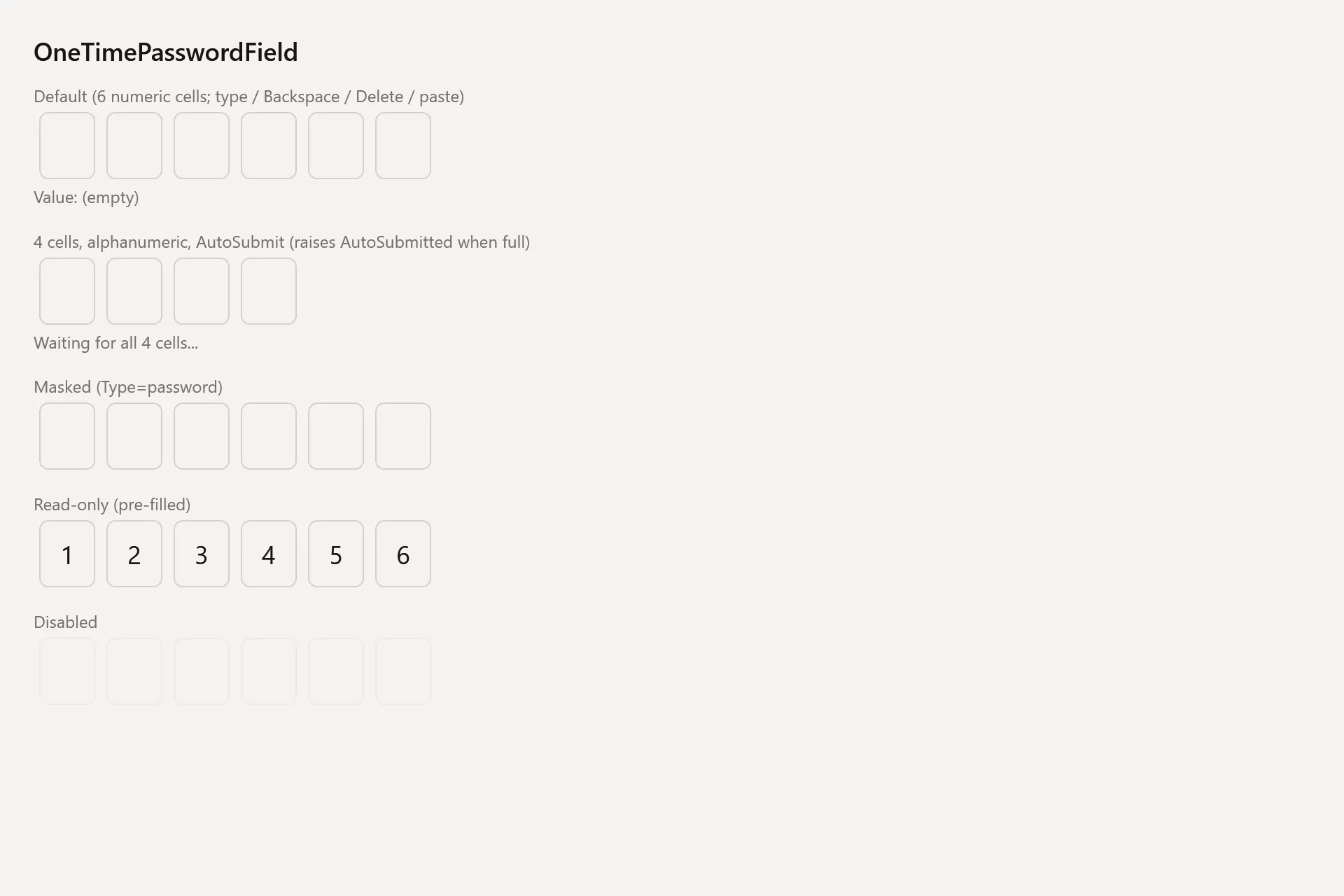
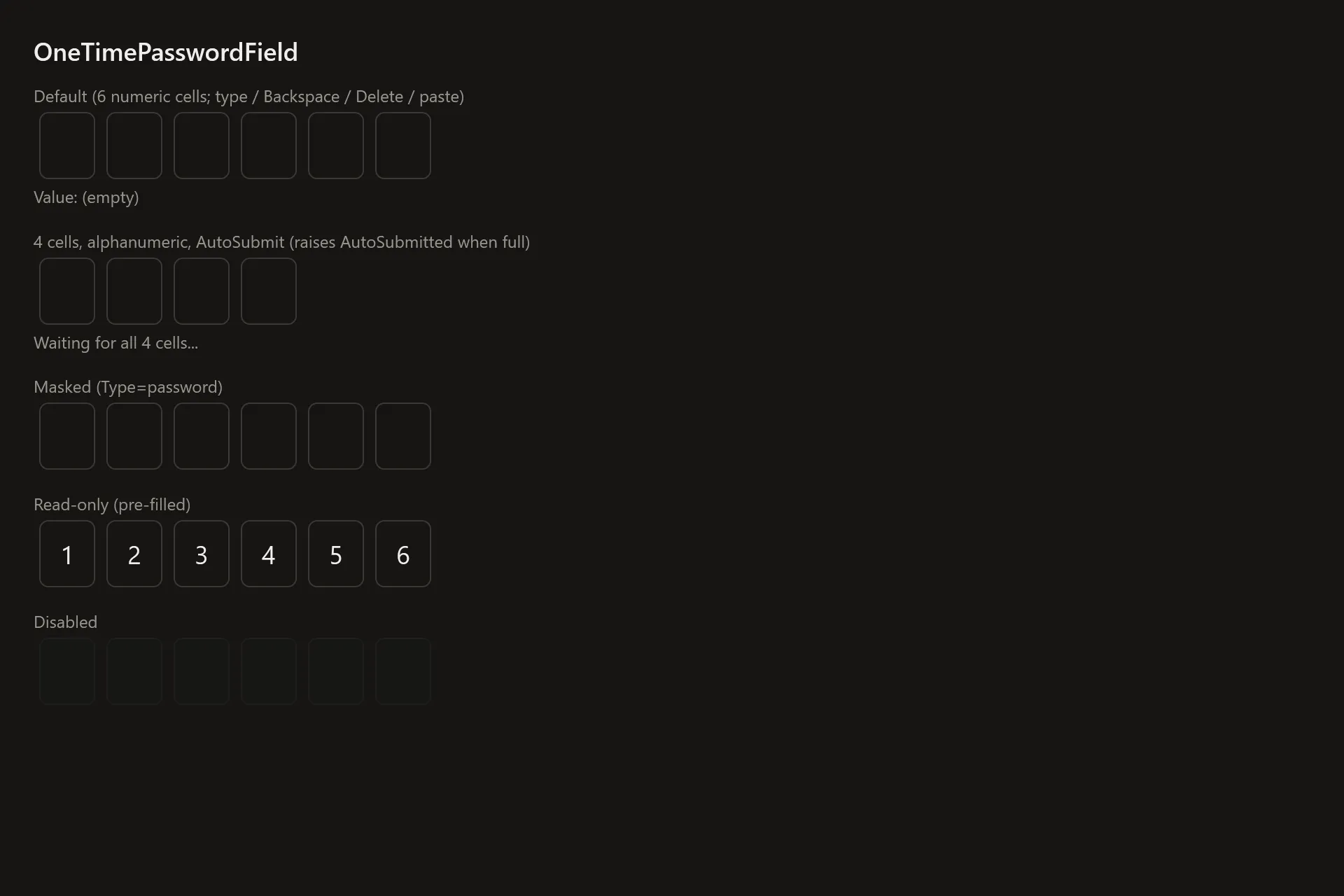
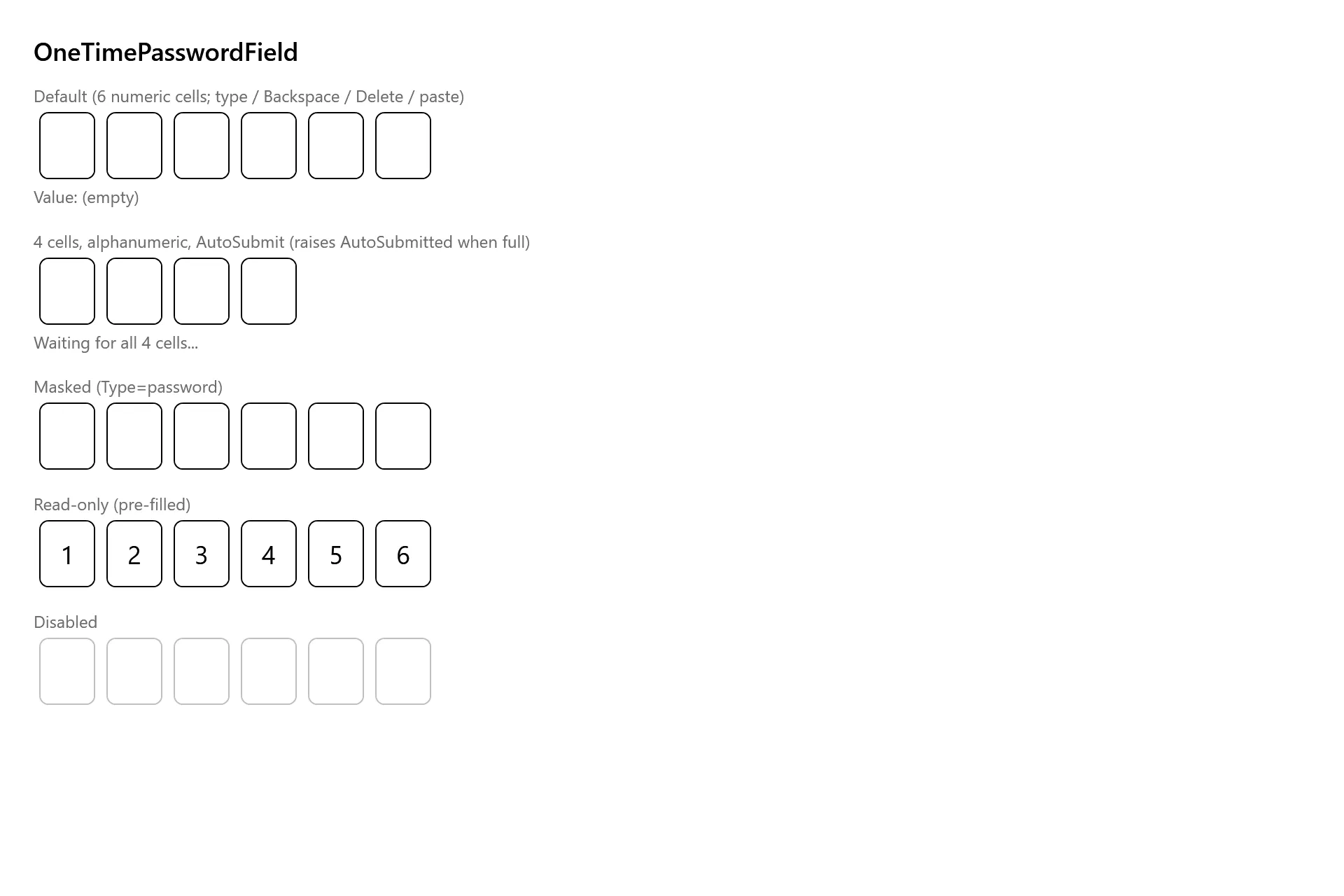
Section titled “Captures”The OneTimePasswordField Gallery page rendered at the pinned commit, in each theme.